


LinkedIn content works when it helps a specific professional audience understand something, solve a problem, or make a better decision. Start with one useful idea, support it with real experience, make it easy to read, and give the reader a relevant next step.
Reach matters, but a post can attract attention without attracting the people your business serves. Define what “working” means before judging a post by its reactions.
What does a successful LinkedIn post do?
A useful post earns the attention of the right reader and delivers on its opening promise. It might explain a difficult tradeoff, answer a common buyer question, or show how to approach a recurring problem.
LinkedIn describes its feed work in terms of professional relevance and authentic content. That supports a practical starting point: write for a person with a real work-related need. It does not establish a guaranteed formula for distribution. See LinkedIn’s explanation of its feed changes.
Use five building blocks
1. Choose one reader and one problem
“Business leaders” is too broad to guide a draft. “A marketing lead trying to get three busy executives posting regularly” gives you a situation to address. Name the problem in plain language before writing the opening line.
2. Make the opening specific
The first lines should explain why the reader should continue. Use a concrete observation, a meaningful question, or a clear tension. Avoid dramatic claims that the rest of the post cannot support.
For example, replace “Consistency is the key to LinkedIn success” with “Our team had plenty of ideas. Every draft still waited a week for approval.” This is an illustrative opening: only use it as a personal claim if it actually happened.
3. Add something only you can contribute
Bring a decision, an example, a limitation, or a lesson from the work. Explain what you tried and why. If you cannot share customer details, describe the pattern without identifying the customer. If the example is hypothetical, label it.
4. Make the lesson easy to follow
Use short paragraphs and a logical order. A dependable structure is situation, decision, reasoning, and takeaway. Choose an image, document, or video when it makes the idea easier to understand, rather than adding a format for its own sake.
5. End with a useful next step
Invite a specific response, point to a relevant resource, or explain how to learn more. “Where does approval get stuck in your team?” opens a more focused conversation than a generic request for agreement.
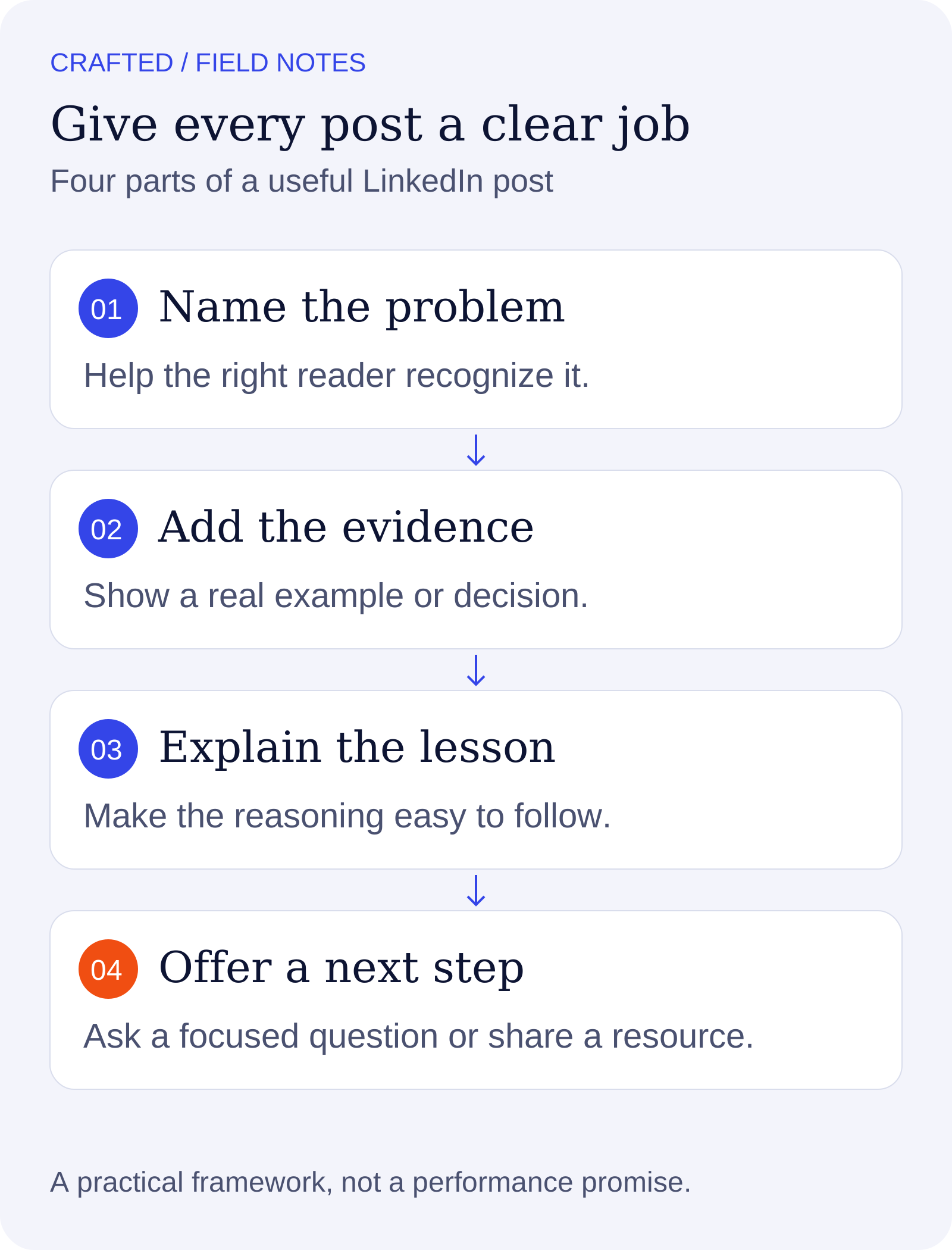
A useful post makes a promise, supports it, and gives the reader somewhere to go next.
Build a small content plan you can repeat
Choose three topic areas connected to your audience and expertise. A founder might cover buyer misconceptions, product decisions, and operating lessons. A specialist might cover common mistakes, practical methods, and emerging questions.
As a starting experiment, draft two posts a week for a month. Keep the cadence manageable enough to reply thoughtfully and collect new ideas. This is a planning suggestion, not a LinkedIn ranking requirement.
Keep an idea bank with four fields: the reader’s question, your answer, a supporting example, and the next step. That gives you stronger inputs than a list of broad topics.
Measure relevance as well as reach
Review several posts together. Look at distribution, the substance of comments, relevant conversations, and the actions you can actually observe. Record which topics bring questions from people you want to serve.
A small post that starts a qualified conversation can be more useful to your business than a widely shared post with no connection to your offer. Avoid treating one strong or weak post as proof of a universal rule.
What does a strong LinkedIn post look like?
A strong post makes a specific promise, provides enough evidence to support it, and leaves the reader with a useful action or insight. You can use the following example to see that structure in practice.
Illustrative post:
Your content calendar may not be the reason your team misses publishing days.
If every draft waits for three people to approve it, adding more ideas can make the backlog worse.
Try separating the review into two decisions: the subject-matter expert checks the facts; one editor makes the final publishing call.
Write down which claims need extra review before the next draft starts. That makes the process easier to repeat.
Where does your team lose more time: finding ideas or getting a decision?
The opening identifies a problem. The middle offers a plausible explanation and a concrete change. The final question invites the right readers to discuss their own workflow. It does not claim a fabricated result or promise that the process fits every organization.
Which LinkedIn content format should you choose?
Choose the format that makes the idea easiest to understand. A clear text post can explain one lesson; a diagram can reveal a relationship; a document can walk through a sequence. The format should serve the information.
Text: a focused opinion, short story, answer, or decision with enough context to be useful.
Image or diagram: a process, comparison, annotated example, or visual detail that would be harder to describe alone.
Document: a checklist or step-by-step explanation with a clear reading order.
Video: a demonstration, walkthrough, or spoken explanation where seeing the person or action helps.
Keep the core takeaway in the accompanying text so readers can understand the point without opening another asset. Use readable type, adequate contrast, and available accessibility options. Avoid packing an entire article into a graphic that becomes tiny on a phone.
How can you turn one topic into several useful posts?
Explore different questions within a topic instead of repeating the same conclusion. Each post should give the reader a distinct reason to spend time with it.
For the topic “team content approvals,” one post could explain why drafts stall. A second could show a review checklist. A third could discuss when additional approval is necessary. A fourth could explain how to collect feedback without erasing the contributor’s voice.
Keep a simple planning note for each idea: audience, question, answer, example, and next step. If two notes contain essentially the same answer, combine them or find a genuinely different angle. Repetition of a topic can build familiarity; repetition without new information can waste the reader’s attention.
What should you check before publishing?
Use a short editorial check to catch the problems that a polished draft can hide. Read the post as someone encountering your work for the first time.
Audience: can the intended reader recognize their situation in the first few lines?
Promise: does the body actually answer the opening question or support the opening claim?
Evidence: are numbers traceable, examples accurate, and hypothetical situations labeled?
Clarity: can you remove jargon, repeated points, or an unnecessary introduction?
Voice: would the named author say this in a real conversation?
Next step: does the invitation fit what the post helped the reader do?
If the post still feels generic, add a useful constraint. Explain when the advice does not apply, why you chose one approach, or what someone should check before following it. Those details often carry more value than an extra motivational sentence.
Why might a useful post receive little engagement?
Low engagement can reflect limited distribution, weak audience fit, an unclear opening, or a topic that does not invite public discussion. It does not automatically prove that the underlying idea is bad.
Compare a group of posts with similar goals. Check whether the right people saw them, whether the opening identified a meaningful problem, and whether the explanation was concrete. Change one element in your next draft and record what you learned. Avoid rewriting your entire strategy around a single result.
Frequently asked questions
How long should a LinkedIn post be?
Use enough space to explain the idea and support it. Cut repetition before cutting useful context. There is no single length that guarantees results across audiences and topics.
Can I use AI to write LinkedIn content?
Yes, as a drafting aid. Supply your actual ideas and examples, then review the voice and facts. LinkedIn emphasizes real perspectives and expertise in its guidance on authentic conversations.
Should every post sell something?
No. Match the next step to the subject and the reader’s likely intent. A practical explanation can build familiarity; an offer-focused post can help someone who is ready to act.
Turn a good post into a repeatable process
Use our LinkedIn lead generation guide to connect useful content to conversations. If several people need to contribute, learn how Crafted supports team content.
Autopilot
Draft your team’s first week, in their voices
Crafted writes the posts, checks your guardrails and lines up the calendar. Your team just approves.
MORE FROM CRAFTED


